You can let chosen players read a Secret you wrote, and all the other players still cannot see it. The warlock can read what her patron wants, and the rest of the table cannot see those wishes.
Share a Secret
- Open World, then select the entry that contains the Secret.
- Inside the description, locate the Secret block.
- Choose Share for that block.
- Tick the players who should read the Secret.
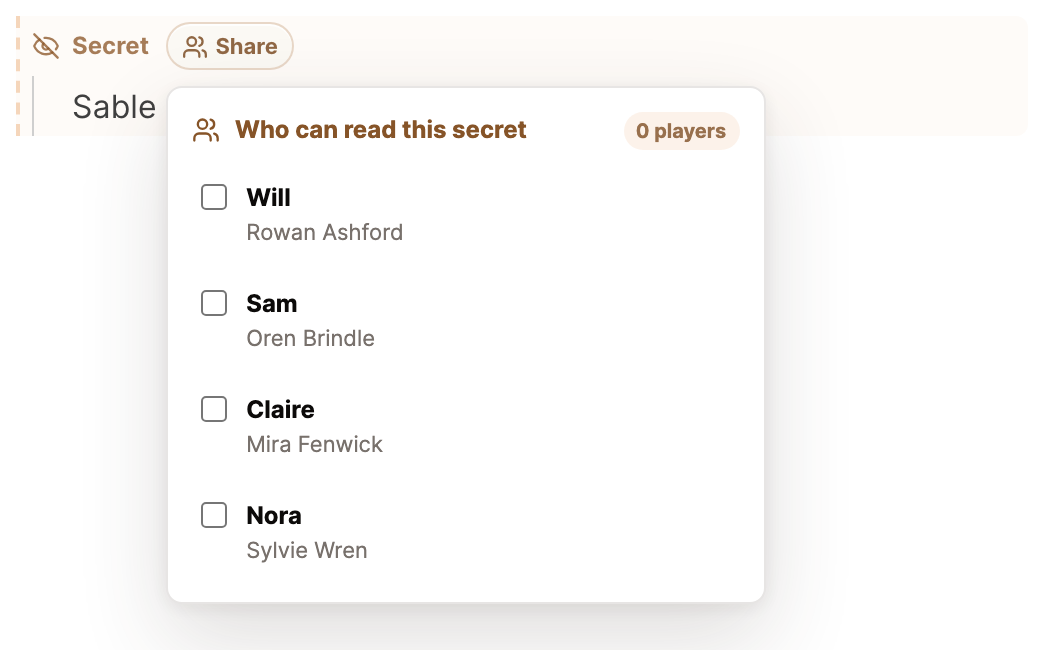
Every tick saves the changes you make. The control then shows Shared with and how many players can read the Secret.
What the player sees
While signed in, the player you selected sees the Secret on that same entry in the campaign wiki, with the label Secret shared with you. Every other player sees a page without it.
When a player's own character page holds the Secret, that player can read it but cannot edit it, so it never ends up in the public description by mistake.
Who can be chosen
The list includes only players with an approved character claim. If the list says No approved players yet., invite the player first and then approve the claim that player submits. Follow Invite a player to claim a character.
You can share Secrets across characters, NPCs, locations, factions, items, and custom types. The campaign owner alone chooses who can read one. When a player writes one, it remains visible only to that player and you and has no Share button.
Give each player their own Secret
You set sharing separately for each Secret, and one entry can contain several Secrets for different people. The warlock reads hers, and the rogue never learns it exists.
Once a secret is common knowledge, select the Secret label to combine it with the public description. To learn the different ways of holding something back, see Add a Secret, or Keep secrets from your players.
