A GM notes block keeps part of a world entry out of sight for your players. The remaining page is still shared, so a public description and your private details can sit together on one page.
Use it on any World Builder entry: characters, NPCs, locations, factions, items, and your own custom types.
Add a GM notes block
- Open World and select the entry you want to edit.
- Click at the end of the description.
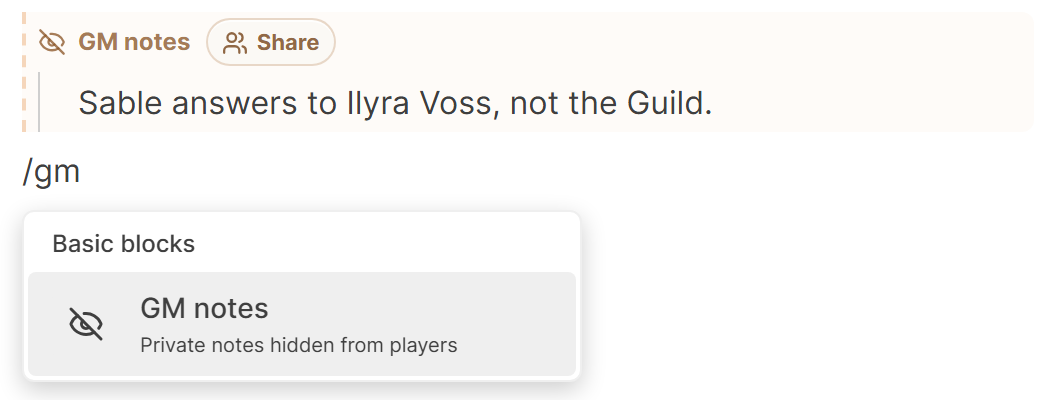
- Type /gm and choose GM notes.
- Click inside the block and write the private text.
To hide something you have already written, select the text and choose Hide from players (GM only) in the formatting toolbar.
What it looks like
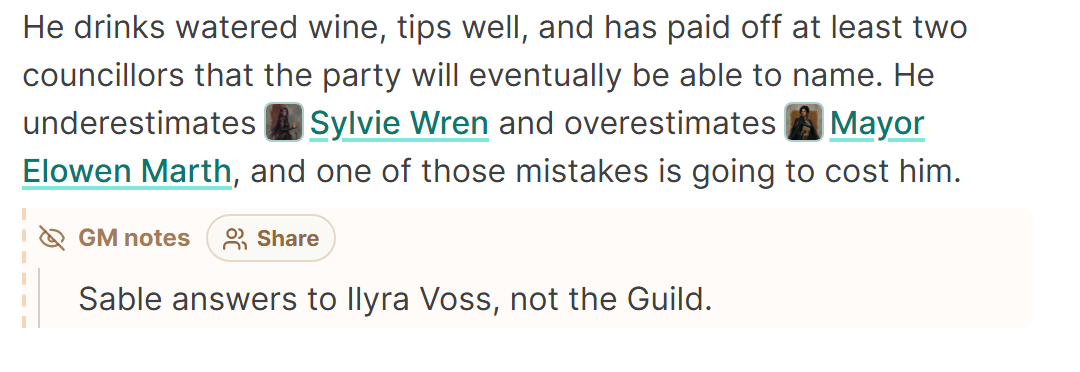
The block sits inside the description with a dashed warm border and a GM notes label. Everything between the label and the end of the block stays private.
Your players never get this content. The server removes a GM notes block before the page arrives, so the text does not appear in the page source either. Campaign Chat runs only for you and any Co-GMs, so it can read your GM notes when it replies.
To check your work on a location, faction, item, or custom page, select the second eye at the top to switch to Preview as player, then back with Back to GM view. For any page, open your wiki in a private browser window, where you are signed out.
Good uses
- An NPC's true motive
- A hidden item property
- Encounter plans
- Unrevealed location details
- Reminders for the next session
Make a private note public
Click the GM notes label when the secret is out. The text stays where it is and the block around it disappears, and the passage becomes part of the ordinary description.
Hide the full page using the eye at the top of the entry when the whole entry must stay secret. Reach for a GM notes block when most of the page is safe for players and a single part is not.
To let one player read one note, see Share a GM note with specific players. For every way to hold something back, see Keep secrets from your players.
