A DM notes block can be opened to chosen players without becoming public. The warlock learns what her patron wants, and nobody else at the table sees a thing.
Share the note
- Open World and select the entry that holds the note.
- Find the DM notes block in the description.
- Choose Share on the block.
- Tick the players who should read it.
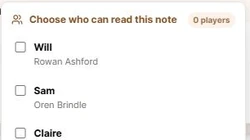
Changes save as you tick. The control then reads Shared with followed by the number of players who can see the note.
What the player sees
A player you chose finds the note on the campaign wiki, on the same entry, marked DM note shared with you. Everyone else still receives a page with no trace of it.
If the note sits on a player's own character page, they can read it but not edit it. That keeps a shared secret from being saved back into the public description by accident.
Who can be chosen
Only players who have claimed a character and been approved appear in the list. If it is empty, invite the player first and approve their claim. See Invite a player to claim a character.
Sharing is available on characters, NPCs, locations, factions, items, and custom types. The campaign owner and any co-DM can manage it.
Give each player their own secret
Sharing is set per note rather than per page, so one entry can carry several notes going to several people. The warlock reads hers, the rogue reads his, and neither knows the other exists.
When a secret becomes common knowledge, click the DM notes label to fold it into the public description. See Add private notes.