How to Keep Track of Your D&D Campaign (Without Using 5 Different Apps)
The tab problem
You're twelve sessions deep. The party has been chasing a conspiracy across three cities. Your rogue's player looks up from their dice and asks: "Wait, which faction does Lord Harwick work for again?"
You know you wrote it down. Somewhere.
You open the Notion page. Not there. You check the Google Doc. Maybe this one. You scroll through a Discord thread from four weeks ago. There it is, buried under a meme and someone's character backstory update.
"He's with the Merchant's Guild," you say. But the scene's tension is gone. You just spent 90 seconds being a filing clerk instead of a storyteller.
This is the D&D campaign tracking problem. Not a lack of effort -- DMs are some of the most organized people I've met. The problem is structural. Your information exists. It just lives in too many places.
And that problem hits hardest not during the session. It hits after.
The night ends. Great session -- Larek finally died, eight sessions of buildup paying off. The party is celebrating in the Discord. You're sitting there with your notes and you realize: now you have to update everything.
Larek's page needs to show he's dead and where it happened. Brenna's page needs to show she was killed by him. Tempest -- the ruins where the final fight took place -- needs to log that both of them met their end there. That's three pages, and those are just the two deaths. There were also two faction reveals, a cursed item the party picked up, and an NPC betrayal you improvised on the spot.
You open six tabs. You start copying and pasting across docs. Forty-five minutes later, you're done. The campaign wiki is current.
You close your laptop and realize you just spent more time on admin than you spent actually playing.
That's the part nobody talks about.
Why campaigns get scattered
The average DM uses three to six tools to run a single campaign.
There's the notes app (Notion, Obsidian, OneNote, take your pick). The map tool. The session recap document. A character tracker spreadsheet. Maybe a dedicated NPC generator. Often a private Discord server just to organize all the other things. None of these talk to each other.
So when you create Lord Harwick in your notes app, write his faction in a separate doc, draw his stronghold on a map in a third tool, and then have six sessions of plot happen to him recorded in a fourth -- good luck connecting all of that four months from now.
You can't. Not without spending 20 minutes before every session doing archaeology through your own notes.
The problem compounds over time. A short campaign is manageable. One that has been running for a year, with 40 NPCs, five factions, and a dozen locations, becomes genuinely unmanageable when the information is scattered. DMs don't forget things because they're bad at note-taking. They forget because the system they built makes remembering hard.
One workspace for your entire world
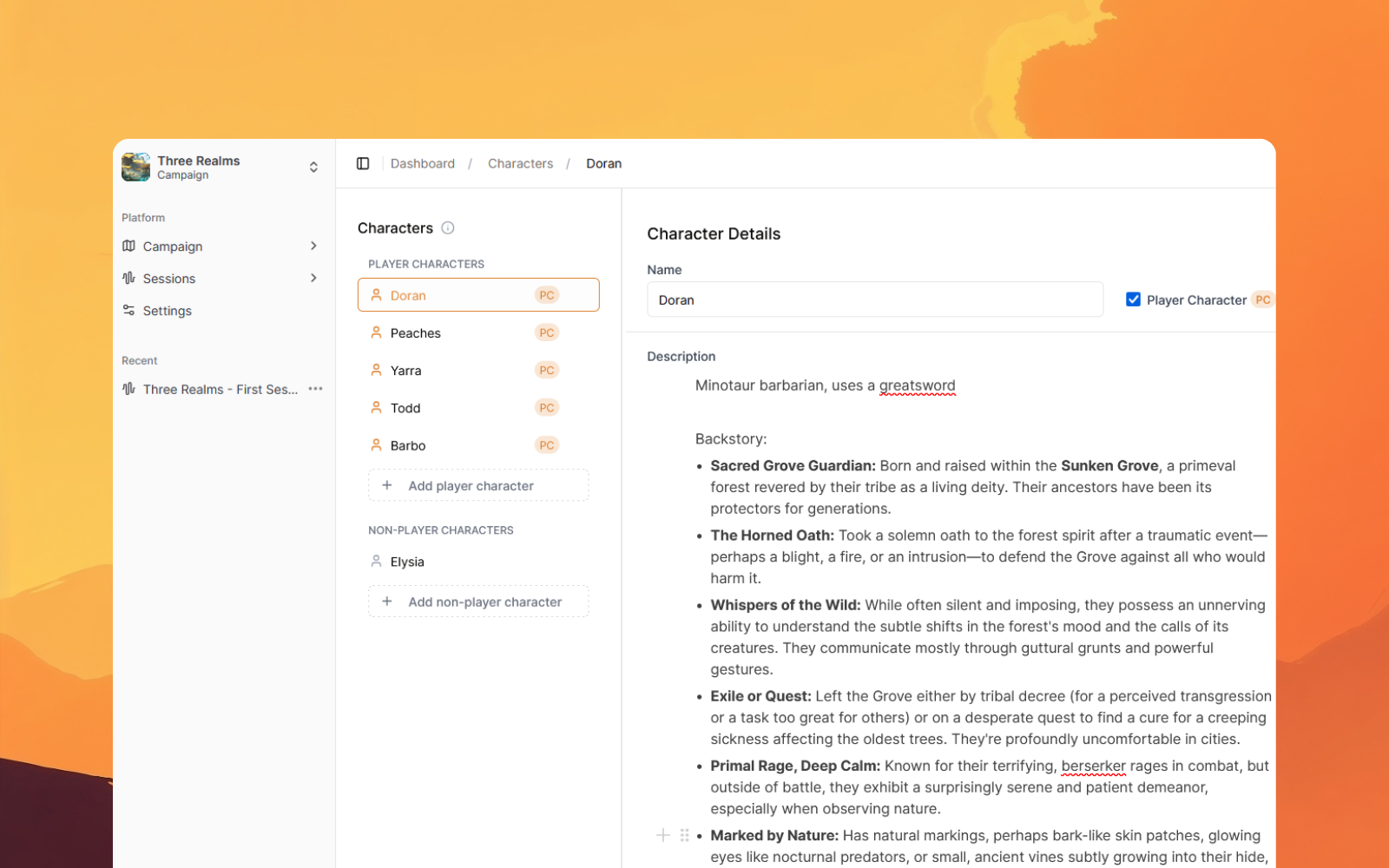
We spent the last several months rebuilding Saga20's World feature from scratch. Every entity in your campaign lives in one place, and anything can connect to anything else.
The new World page brings together all five entity types in a single workspace.
Characters and NPCs were already there. Locations too. We added items and factions in this update -- the two types that showed up most often in user feedback as missing pieces.
If recurring characters are the part that keeps slipping, start with the free D&D NPC tracker. It shows which fields belong on one NPC record and what to update after each session.
Items carry more plot weight than most tools acknowledge. The cursed dagger the rogue won't admit to using. The letter the party forgot to read. The artifact the villain needs for the ritual in act three. These objects deserve pages, not just cells in a spreadsheet.
Factions are the connective tissue of most long campaigns. The Merchant's Guild. The Thornwood Cult. The city watch that looks the other way for the right price. Giving factions their own entity type means you can link members, locations, items, and enemies directly to the organization they belong to. When you pull up the guild's page, everything connected to it is already there.
The graph that changes how you see your world
We expected people to like the @ linking. The graph was the surprise.
Type @ anywhere in Saga20 -- in a description, a note, a location detail -- and it creates a live link to another entity. Lord Harwick belongs to @Merchant's Guild. The guild operates out of @Thornwall Keep. The keep is guarded by @Aldric, a soldier who owes Harwick a favor because of the @Silver Dagger incident in session 4.
Each @ mention becomes a thread. Open the Campaign Graph and all those threads are visible at once -- an interactive map of every relationship in your world.
If you use Obsidian for personal notes, this will feel familiar. The mental model is the same: write, link, then zoom out. The difference is the graph builds itself from your actual campaign, not from entries you maintain manually.
Click any node and you see everything connected to it. Click Lord Harwick and you see the guild, the keep, the soldier, the dagger, and every session where he appeared. It's oddly satisfying in a way a spreadsheet never is.

Your campaign remembers (even when you don't)
Most campaign tools help you store information. What they don't do is make that information find you.
That's what auto-enrichment does, and it's the thing we're most excited about in this update.
After every session you process in Saga20, the app reads through the summary and identifies the major plot moments involving each entity. Those moments get added to the relevant entity pages. You don't tag anything or manually update anything -- process the session and it's done.
Go back to the Larek/Brenna/Tempest session. Here's what auto-enrichment writes, automatically, the moment you process the recording:
Larek's page: Session 8: Killed Brenna during the battle at Tempest. Slain by the party shortly after. His journal was recovered -- reveals longstanding ties to the Iron Veil faction.
Brenna's page: Session 8: Killed by Larek at the ruins of Tempest. Her death was a turning point for the party's cleric, Sera.
Tempest (location): Session 8: Site of the final confrontation with Larek. Brenna died here. Party discovered evidence the ruins were once an Iron Veil outpost.
Iron Veil (faction): Session 8: Implicated by Larek's journal. Party now aware of their connection to Tempest and the broader conspiracy.
Larek's Journal (item): Session 8: Recovered from Larek's body at Tempest. Contains intelligence linking the Iron Veil to three prior incidents.
That's five pages updated. One session. Zero minutes of manual work.
Now multiply that by a campaign that runs for a year. Twenty sessions. Forty NPCs. A dozen locations. Every one of them carrying their own history, automatically, every time you run a session.
The 45-minute post-session admin block disappears. You process the session, the wiki updates itself, and you're done.
This matters most for entities you assumed were minor. That tavern keeper you improvised in session 3 -- three sessions later, the players decided she's central to the main plot. Without auto-enrichment, her history is buried across four recap docs you'll spend ten minutes cross-referencing. With it, everything that happened to her is already on her page, in order, waiting for you when you sit down to prep.
Open any character, NPC, or location and you see exactly what happened to them, across every session. The information is where you need it.
Make it look like your campaign
Two smaller additions worth a mention.
Emoji icons are gone. We replaced them with a proper icon library -- hundreds of options covering weapons, creatures, buildings, symbols, and more. You can also upload a custom icon if nothing in the library fits your world.
Cover images are new too. Add a portrait to a character, a landscape to a location, an illustration to a key item. You can also embed images inside descriptions -- useful for handouts, maps, or anything visual that belongs alongside the text rather than in a separate file.
Neither of these changes how the campaign functions. But there's a real difference between a campaign wiki that looks like every other campaign wiki and one that looks like yours. After a year of running the same campaign, that distinction starts to matter.
Tracking shouldn't be a second job
The reason most DMs struggle to keep track of their campaigns isn't lack of discipline. It's that the available tools require discipline to compensate for structural problems. You maintain connections manually. You remember to update NPC notes after the session. You go find the history when you need it during prep.
A better system does that work for you. Not through willpower -- just through not requiring you to do it manually in the first place.
That's what we built in the March 2026 update. If you want to try it, Saga20 is free to start.
For more on keeping your campaign organized between sessions, use the five-part D&D campaign manager test, then read The Art of Campaign Continuity and Mastering the Session Recap.
Questions
Common questions
Free Tools
Helpful for This Topic
Drop the notebook
Try Saga20 for free
Record your session. We'll write the notes and build your wiki.
Get started freeNo card needed